 Buy me a coffee
Noah K.
Co-founder, PartnerDeck
A fast, friendly way to run sprint retros. The boards keep us focused and we’ve used it happily for years.
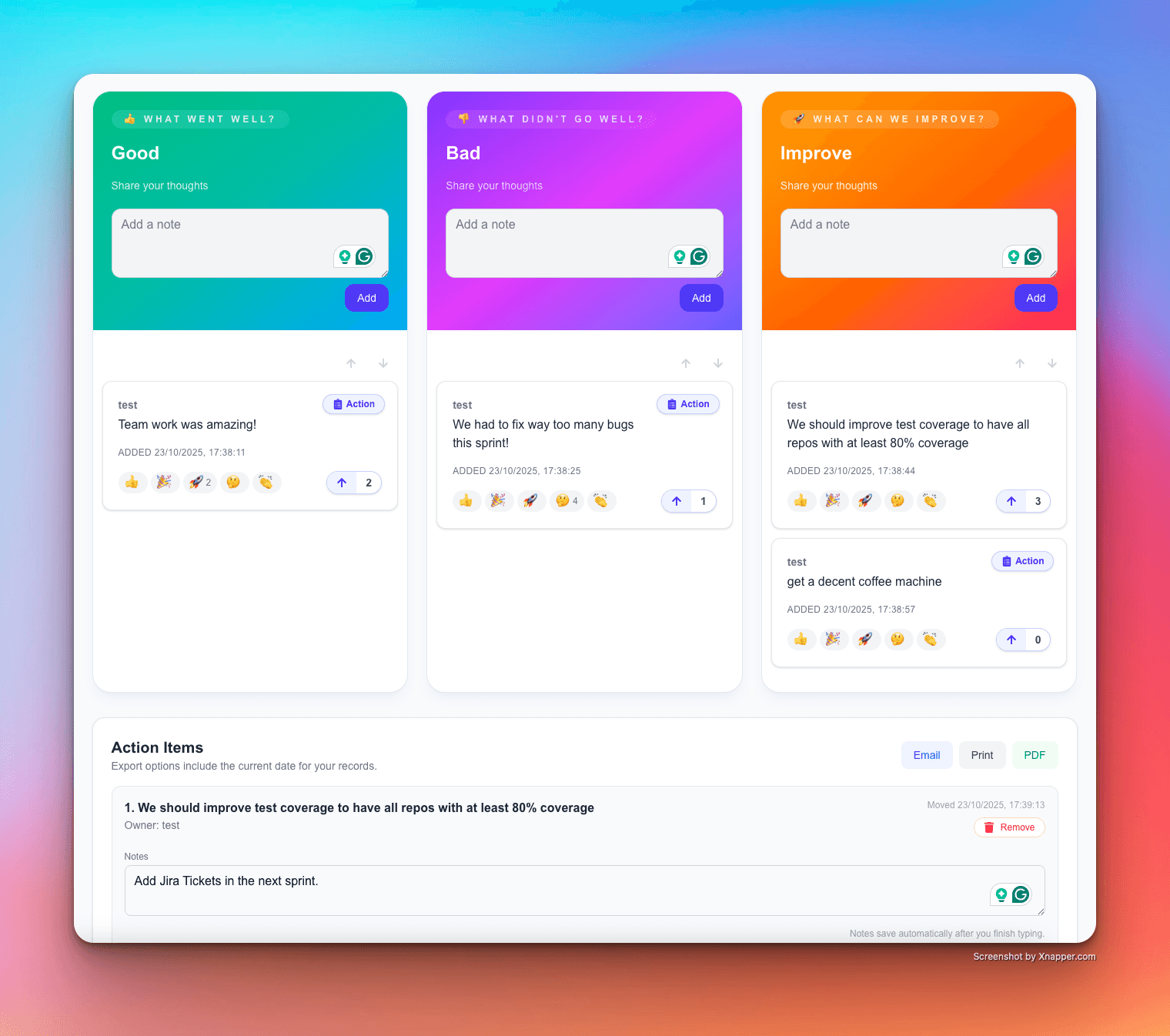
Reflect with your team using online retrospective boards. Choose Good/Bad/Improve, Start/Stop/Keep, or Went Well/To Improve/Action Items. Every entry shows the author’s name, supports upvotes and emoji reactions, and can be moved to an Action List you can export to email, print, or PDF (with date). Share a room link. No data stored. 100% GDPR compliant.
No signup • No tracking • Shareable room link • Works on desktop & mobile



Noah K.
Co-founder, PartnerDeck
A fast, friendly way to run sprint retros. The boards keep us focused and we’ve used it happily for years.

Peter Nadarkiewicz
Scrum Master, Iterato
Thanks for building this! The go-to-App when starting a Scrum Master journey.

Willow Bridges
Engineering Manager, HotelJet
I’ve used this tool at different companies. It’s simple, effective. And its free! What’s not to love?

Luis Palomero
Data Scientist, Declarado
Fantastic for running retros — even with non-technical groups. Clean, quick, and everyone contributes.

Krissy L.
Product Lead, FlowLabs
I first tried it on a previous project and it quickly became our go-to. Easy to use, flexible, and the easiest way to run team retros.

Januka W.
Product Manager, BlackSwan Tech
Great for gathering feedback from distributed teams. Columns for each feedback type, voting, and no signup required — plus it’s free.
If you’ve tried other online retrospective tools, you’ll notice we keep things simple, private, and fast. No accounts, no data storage, and GDPR by design — while still giving you three-lane boards, upvotes, emoji reactions, and an exportable Action List (email, print, PDF with date).
Known for lots of templates and integrations. They emphasize configurable boards, voting, and exports, plus integrations like Slack, Confluence, Jira, and Trello.
Source: EasyRetro features & integrations pages.
Positions heavily on AI features (summaries, sentiment, insights) and enterprise credentials like ISO-27001 and SOC-2. Also highlights action tracking and integrations.
Source: Reetro product & trust pages.
Broad collaboration platform with hundreds of templates, voting, andAI grouping of notes. Integrates with tools like Jira/Azure DevOps and supports private mode.
Source: Miro Retrospektive page (DE).
Our online retrospective tool helps Scrum Masters and agile teams run sprint retrospectives with three structured lanes: Good/Bad/Improve, Start/Stop/Keep, or Went Well/To Improve/Action Items. Add entries with your name, upvote what matters, use emoji reactions to acknowledge wins, and move items into an Action List you can export to email, print, or PDF (date included).
Retrospectives work best at the end of a sprint or milestone. Keep them concise: capture feedback, prioritize with votes, agree on owners, and export your action items for follow-up.
Many retro tools store data or require accounts. We don’t. Sessions are ephemeral, we store nothing, and we’re GDPR-compliant by design. That keeps friction low and participation high.
online retrospective tool, sprint retro board, agile retrospective online, start stop keep tool, good bad improve board, went well to improve action items, retrospective with upvotes, GDPR retrospective, remote team retro
Click “Start a Retro” to spin up a room with your chosen board format.
Invite teammates instantly. No accounts needed. No tracking.
Add entries with names, upvote & react, move to Action List, export with date.
Built privacy-first: no data stored, shareable room links, no signup, and fully GDPR-compliant.
No. Create and share a room with one click.
Yes. We don’t store your data. Sessions run in-memory for the duration of your room.
Good/Bad/Improve, Start/Stop/Keep, and Went Well/To Improve/Action Items — each with three lanes.
Yes. Entries support upvotes and emoji reactions to quickly find priorities.
Move items to the Action List and export to email, print, or PDF — the PDF includes the session date.
We use cookies to understand how our product is used so we can make it better. Analytics cookies are only loaded after you agree.